Fast mode
Checks only availability and protocols. The best option when you need to quickly clean dead addresses out of a huge list and get a live pool.
Before putting proxies to work, you need to check them: this rule is the same for a paid pack of private addresses and for a free list downloaded from a forum. The plan description and the real condition of the addresses almost never match completely: some IPs are already switched off, some barely pull through and deliver a couple of kilobytes per second, some are listed in antispam databases and catch a captcha on the first request, and some reach the internet from a country you did not pay for at all. The only way to see this is to run the list through an online proxy check.
Checker.net is a free proxy checker that works right in the browser: no programs, no installation, and no account. You can paste the list into the field, attach it as a file, or give a link to it. Within a few seconds you can see for every address:
One run holds up to 30,000 addresses: a convenient bulk proxy check and a proxy list check with no limit on the number of runs. Results are not saved up until the check finishes; they arrive as a stream, so the table grows in front of you.
A proxy checker, also called a proxy validator or a proxy-list tester, is a service that connects to each proxy server itself, sends requests through it, and decides from the responses whether the address is usable. Without such a tool you would have to enter every IP into the browser settings one by one and see whether the page opens. A checker does the same thing for the whole list at once and returns not a vague "it seems to work", but a table with numbers.
Tools of this class differ a lot in how deeply they look. The simplest checker can say only one thing: the address answered or stayed silent. That is not enough for real work, because a proxy that responds is not yet a useful one. It may be listed in a dozen spam databases. It may not let you into the social network it was bought for. It may be recognized by sites as a server IP where a residential IP is needed. It may take fifteen seconds to respond where the norm is hundreds of milliseconds. That is why we measure not only availability, but quality: we find out the IP origin, look at its reputation, check how it behaves on major platforms, and combine all of this into a single score.
Checking online is more convenient than a proxy checking program, and there are three reasons:
After you click "Start check", the checker reads the list line by line. In each line it detects the format, extracts the host, port, login and password, and skips junk and duplicate addresses. Then all proxies are checked in parallel: protocols first, then the other parameters.
To check a protocol, the checker opens a connection through the proxy and calls a service resource that reports the IP address of the client that reached it. One such request gives a lot at once: it confirms that the proxy is alive, shows the response time and, most importantly, reveals the exit IP — the address that sites will see. HTTP/HTTPS and SOCKS5 are tested separately. On the same host and port, protocols often behave differently: the description says HTTP, but the address actually understands only SOCKS, or the other way around.
The exit IP is then used to determine where the address is and who it belongs to: country, region, city, and type — mobile, residential, or corporate.
At the same time the IP is checked against a local blacklist database that we regularly update from open antispam repositories.
In full mode the most valuable step is added: requests go through the proxy to eleven popular services, and it becomes clear which of them let this address in and which close the door in front of it.
Results go to the interface as soon as they are ready, not in one batch at the very end. Even on a long list you do not have to watch a running progress bar: the first rows appear within seconds, and working addresses can be taken while the checker is still busy with the rest.
The main thing to know about an address is whether it works. If the proxy did not respond, the checker says why: the connection was refused, the wait timed out, authorization failed, or the server returned an error. The difference here is fundamental. "The address is dead" and "the address is alive, but there is a typo in the password" are two completely different stories, and the error wording immediately shows whether to drop the proxy or just fix your list.
HTTP/HTTPS and SOCKS5 are checked for each address separately, and each protocol gets its own response time. That shows what the proxy can actually do, not what the seller says. This closes a very common mistake: a working SOCKS proxy is declared broken only because it was contacted as HTTP.
Response time is how long it takes from sending a request through the proxy until the answer arrives. It decides everything where reaction matters: in the browser, when automating actions in interfaces, and when parsing in many threads with short requests. We measure channel speed separately. It matters when large volumes are pushed through the proxy: exports, media files, video. These two numbers should not be confused — an address can answer instantly and still deliver data at a speed of hundreds of kilobits.
The checker determines where the address comes from: a mobile operator network, a home connection, or a data center. How much sites trust the traffic is largely decided by this, so the IP type is one of the three parts of the rating. Details are below, in the section on proxy types.
The IP is checked against databases that list addresses seen in spam, attacks on websites, and fraud.
A single hit is enough to see that the address has a damaged reputation, and some services will meet it with a captcha or a refusal.
The most practical part of the report. Through the proxy the checker opens eleven major platforms and for each one reports whether it worked, how long it took, and which HTTP code came back. An address that is alive by every technical sign can easily be blocked on the exact service you need — and finding that out here is much more pleasant than from an email about a blocked account.
The rating from 0 to 5 combines three things: IP type, blacklist reputation, and service results. With it you do not need to read every row of the table — it is enough to sort the list and take the addresses from the top.
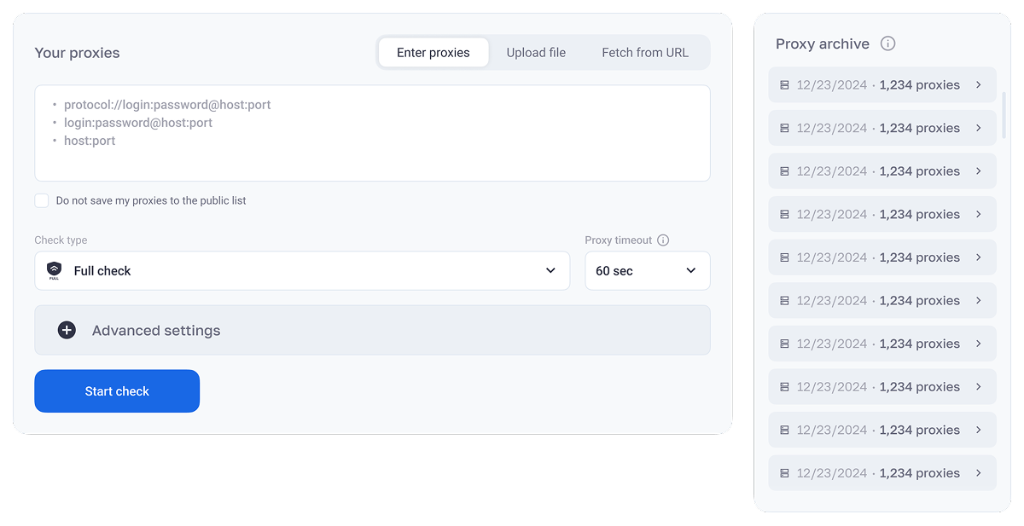
Add the addresses. Paste them into the "Enter proxy" field, attach a document with the "Upload file" button, or give a link to the list via "Upload by URL". You do not need to align the lines to one format: the checker will sort it out itself.
Decide what happens to the addresses after the check. For purchased private proxies, check "Do not save my proxies to the public list" — then they will not end up in the open archive.
Choose a mode. Fast only confirms that the address is available. Full also checks services and assigns a rating. Selective does the same, but only for the platforms you marked.
Set the timeout. The default value is 10 seconds. If you lower it, dead addresses are filtered out faster; if you raise it, slow but working proxies are not lost.
Look into the advanced settings, when you do not need every service, and uncheck the extra boxes.
Click "Start checking" and watch the table: result rows appear one after another, not all together at the end.
When the check finishes, filter the table by status and score, copy the suitable addresses — and you can start working. Without your permission the submitted list is not stored anywhere.
The checker understands three ways to write a proxy and does not require any settings for that:
Entry | What it is for |
|---|---|
host:port | Open proxies without a login and password — for example, addresses from free lists. |
login:password@host:port | Paid proxies that need a login and password. Sellers give most addresses in this form. |
protocol://login:password@host:port | A variant with an explicit protocol — for example, socks5:// or http://. |
The host can be either an IP address or a domain name: quite a few providers issue proxies as a domain with a port. Formats can be mixed in one list — each line is processed on its own.
There are also three ways to upload. Text paste: addresses are copied into the field, each on a new line. File: suitable if the list was exported from the seller account or stored in a text document. Link: convenient when the list sits at a permanent URL and is updated regularly. The checker downloads the page, picks the proxies out of it, and starts the check right away. For those who watch public sources, this is the most practical option — you do not have to transfer the data by hand every time.
There are three modes, and each is meant for its own task. In essence the choice is between speed and detail.
Checks only availability and protocols. The best option when you need to quickly clean dead addresses out of a huge list and get a live pool.
Availability, geo, IP type, blacklists, all eleven services, and the rating. It is on by default and gives the most detailed picture for each proxy.
The same as full, but only for the platforms you marked. It works faster and reflects the requirements of a specific task better.
The timeout is set from 1 to 60 seconds, and the default is 10. That is how long the checker waits for a proxy response before marking it unavailable.
If timeouts keep appearing for a list that should obviously be working, start by increasing this value.
A rating is a score from 0 to 5. It is not there to tell you whether an address is alive, but whether you should trust it with work. Most checkers stop at the status "works", although two equally alive addresses can differ by months of account life. We add the score up by a weighted scheme of three parts: IP origin, its reputation on blacklists and how it actually opens popular services. The result takes into account the nature of the address, its past, and its behavior right now — so the score comes out objective.
What the score from 0 to 5 is made of
Fig. 2. Weights of the rating components
Component | Adds | Subtracts |
|---|---|---|
Mobile IP | +1.0 | — |
Residential IP | +0.5 | — |
Corporate IP | +0 | — |
Blacklist reputation | +2.0 when the IP is not found in any database | -0.2 for each database where it is found, no more than 2 points in total |
Service availability | +2.0 when every checked platform opens | -0.2 for each closed service, no more than 2 points in total |
Highest score | 5.0 points |
The total is the sum of three numbers: the score for the address type, the score for reputation, and the score for services. Reputation and services follow the same scheme: a perfect result brings all 2 points, and each deviation subtracts 0.2. Neither of these parts can lose more than two points. It can fall to zero, but it does not go negative and does not pull the other terms down. The score therefore always stays between 0 and 5, and the shares stay in balance: 40% each goes to reputation and to actual work with platforms, and the remaining 20% goes to IP origin.
Which address | Calculation | Score |
|---|---|---|
Mobile, not listed in databases, opens all 11 services | 1.0 + 2.0 + 2.0 | 5.0 |
Residential, clean reputation, 1 service closed | 0.5 + 2.0 + 1.8 | 4.3 |
Server from a data center, not in databases, opens everything | 0 + 2.0 + 2.0 | 4.0 |
Residential, found in one database, 2 services closed | 0.5 + 1.8 + 1.6 | 3.9 |
Corporate, found in three databases, 6 services closed | 0 + 1.4 + 0.8 | 2.2 |
Corporate, ten or more hits, nothing opens | 0 + 0 + 0 | 0.0 |
In selective mode the service part is counted only for the platforms you marked, and the rule is the same: minus 0.2 for each closed one in your set. If three services are left in the check, this part can lose at most 0.6 points, and reputation starts to affect the score more. This is useful when you need a number for your own scenario, not an averaged score "for the whole internet".
A clean address. It is not on blacklists, every checked platform opens, and the IP type earns high trust from sites. You can keep the most sensitive tasks on such proxies: ad accounts, social accounts, payment and banking services, sign-ups. The maximum of 5.0 goes only to a mobile address with no database record and with every service open — that is by design.
A working address, but with nuances. It either has separate records in antispam databases, or some services do not open. For parsing, price tracking, collecting open data, and other tasks where reputation does not decide everything, this is a normal choice, and such proxies are usually cheaper. In this range look not only at the number, but at which platform failed to open. A server address with 4.0 and full availability is more reliable than a residential one with 4.3 if the latter has the Instagram you need closed.
A dubious or blocked address. It is listed in several blacklists at once, and most platforms do not let it in. You should not sign in to accounts through such proxies: the risk of a captcha, an identity check, or a block on the first action is high. It may still do for one-off technical tasks, but it does not belong in a pool for accounts.
Task | Minimum | What to check beyond the score |
|---|---|---|
Sign-ups, ad accounts, payment services | from 4.5 | Mobile or residential IP, no database records |
Running existing social accounts | from 4.0 | Whether the platforms where you have accounts actually open |
Collecting search results and positions | from 3.5 | Google and Yandex must open, and the geo must match |
Parsing open data, tracking prices | from 3.0 | Here speed and response time weigh more than reputation |
Streaming and media services | from 3.0 | YouTube, Twitch, and Spotify open, with speed to spare |
These thresholds are a guide, not a law: the decision is made from the score together with the details of the report. The main benefit is elsewhere. You can sort the table by rating in a second, and the addresses worth taking are immediately on top. Everything below your bar can be sent back to the seller for a replacement in one batch, without reviewing every address by hand.
Take two proxies, both marked "works" in the table. The first is a mobile IP that is not in any database and through which all eleven services open: score 5.0. The second is a server address from a data center, found in three blacklists and closed on six of the eleven platforms: score 2.2. Formally there is no difference, both are alive. In practice the first will last for months, and the second will get a ban on the first sign-up. The rating shows exactly this difference, so sorting by it saves more time than any status filter.
On large volumes this is especially noticeable. A status filter removes only a few thousand dead proxies from the list — in a purchased pool there are usually ten to forty percent of them, in a free list almost all of them. But for half of the remaining "alive" ones the score will be below 3.0, and before you start work you can see that only from the rating. The average score of a pool also helps compare providers honestly: not by the text on the site, but by one measurable number on the same set of platforms.
The rating captures a moment, so swings from check to check are normal. Mobile proxies change IP on rotation, and the next run checks a different operator address. We regularly update the blacklist database from open antispam repositories, so an address can leave a list or get onto one because someone used it before you. Platform policy by ranges changes too: a service that opened in the morning can show a captcha in the evening. And with a short timeout, slow addresses are filed as unavailable and lose points for availability. If scores jump noticeably, increase the timeout and check again.
In the API the score of each address comes back in the sc field, so selecting by a threshold and sorting a pool is easy to hand to a script. The rating is assigned in full and selective modes. Fast mode does not have it: that mode checks only availability, but a large list gets through much faster.
A proxy type answers who the IP actually belongs to: a mobile operator, a home provider, or hosting in a data center. Speed, stability, and above all the degree of trust with which sites accept the traffic follow from that. The right type affects both the cost and the risk of a block, so when buying this is the first thing to decide, not a formal line in the plan.
Traffic of these proxies goes through mobile operator networks, from the same addresses as millions of smartphone owners. The operator gives one IP to many subscribers at once and keeps changing it. That is why sites are very reluctant to block mobile addresses: thousands of real users would be caught. This is also where the highest reputation among all types comes from.
Mobile proxies are chosen where accounts are at stake: social promotion, traffic arbitrage, ad accounts, sign-ups, services with strict antifraud. The downsides are cost and speed. A mobile connection is slower and less stable than a wired one, and during rotation the address can disappear for a few seconds. For mass parsing this is expensive and simply unnecessary.
These are IPs of real home connections that ordinary internet providers issued to their subscribers. To a site such a visitor is no different from an ordinary person sitting at home in a particular city. Residential proxies are a universal tool for web scraping, ad verification, regional results analysis, bypassing geo-restrictions, and any task that needs a "human" trace and a wide choice of locations.
By the balance of trust and price this is the optimal option: cheaper than mobile and noticeably more reliable than server proxies. How stable a particular address is depends on whose home connection is behind it. That is why such a pool is especially useful to check before work.
IPs of hosting platforms and data centers. They are chosen for minimal delay, a thick channel, steady work without drops, and an affordable price. When you need a lot of traffic and many parallel streams, there is no better option. Parsing large volumes, tracking prices and availability, automation, mass data checks, bots, and service integrations work perfectly on server proxies.
Their weak spot is how recognizable they are. Data center ranges are well known, and sites with bot protection immediately mark such traffic as non-household. The address does not become a bad one because of that; it simply does not fit where the service expects a home user. Zero points in the score means not "the proxy is bad", but "there is no trust bonus".
A blacklist is an open database of IP addresses noticed in unwanted activity. Antispam projects, hosting companies, mail services, and security researchers keep such databases, and mail servers, CDNs, antifraud systems, and site owners use them. If an address is listed, any service may refuse it without looking into the details.
We check every IP against a local database that is regularly filled from open antispam repositories. Addresses get there for three reasons most often:
Keep in mind: most of the time you have nothing to do with it. Dozens of people use a public proxy at the same time, and addresses from pools are resold and rented out again for years. Together with an IP you also get its past, including the consequences of what others did before you.
Clean IP — not found in any database. It brings the full +2 points to the score, and services treat it neutrally.
Suspicious IP — found in separate databases. Some services will start showing a captcha and asking for extra confirmation.
Blocked IP — listed in several blacklists at once. Many platforms will refuse it access, and it is not suitable for working with accounts.
If your own IP landed on a blacklist, you will have to get it out through delisting, separately in each database, and before that you need to stop the activity that put it there. With a purchased proxy it is simpler: it is faster to ask the seller to replace the address. A normal provider changes blocked IPs without an argument, and the check results make the conversation specific.
Most checkers do not have this feature, although in practice it is more useful than all the others. An address can be alive, with a clean history and the right country — and still useless for the job, because the platform you need already knows this address and will not let it in. We find that out in advance. Through every proxy the checker calls eleven popular services and shows the result for each one separately: whether the service opened, how long the response took, which HTTP code came back, and which error appeared if one could be read.
All eleven platforms are checked by default. When you only care about two or three, clear the other checkboxes in the advanced settings: the run gets shorter, and the score reflects your own set. In the results table this folds into a counter like "9 / 11", and a click opens the list with details for every platform.
Platform | What the check shows |
|---|---|
Google | Search, ads, accounts. Google quickly recognizes server IPs and shows them a captcha, so it is the best place to see how clean an address is. |
Yandex | Russian-language search, Direct, Metrica. This check is required if you work with Russian traffic and regional results. |
Facebook | Business managers and ad accounts. Meta fraud protection is considered one of the strictest, and an IP with a dark past almost immediately turns into a document check and a closed account. |
Instagram | Accounts, automation, data collection. The platform is especially demanding about IP type, and server addresses do not last long on it. |
TikTok | Strictly tied to geo and aggressively protected from bots. The check shows whether the service will accept the address as an ordinary user from the right country. |
YouTube | Watching and downloading video, regional restrictions. For YouTube availability is not enough: channel speed matters too. |
X (Twitter) | Collecting open data and working with accounts. The network often blocks whole ranges of hosting providers. |
VK | The largest social network of the RuNet: accounts, ads, collecting data from communities. |
Twitch | Streams and chat. It shows well whether an address fits tasks that need a stable connection and low delay. |
Spotify | The account is strictly tied to a country. The check confirms that the service sees the IP of the right region in the address. |
Pinterest | Traffic tasks and data collection. The platform looks closely at the reputation of the address. |
Three values come back for each service: whether the page opened, how long the response took, and which HTTP code the platform returned. The code says the most: it shows why the address did not fit and what to do next.
Response | What this usually means |
|---|---|
200 | The service opened without problems, and the address can be used for this platform. |
301, 302 | A redirect. Most often this is a move to a regional version of the site, and then everything is fine. But if the service sends you to a check page, it does not trust the address. |
403 | Entry is closed: the platform knows this address or its whole range. The clearest signal that the proxy does not fit this service. |
429 | Too many requests. This often happens on shared proxies, because you are not the only one working through one address. It is a risk for accounts and sometimes acceptable for a one-off parse. |
5xx | A failure of the service itself or of an intermediate gateway. This result is worth checking again: a single error of this class does not always mean the proxy is at fault. |
Timeout | The response did not arrive in the allotted time. Either the channel is slow, or traffic to the platform is being filtered. Increase the timeout and repeat — some addresses will get through. |
Connection error | The connection was dropped or not accepted. This is a block at the network level or a limit on the proxy server itself. |
Response time should be read together with the code. If a service opened in five seconds, it is formally available, but working through such an address in an ad account interface will be painful. When a dozen platforms show where the response arrived instantly and where it barely got through, the real quality of the channel becomes obvious.
Task | What to check |
|---|---|
Arbitrage, Meta ad accounts | Facebook and Instagram, plus Google if the mix includes display ads |
TikTok and creatives | TikTok and YouTube, and the geo must match exactly |
SEO, results and positions | Google and Yandex |
Russian-language market: accounts and ads | VK, Yandex, Facebook |
Video, music, streams | YouTube, Twitch, Spotify |
Parsing and collecting open data | Google and the platforms you collect data from |
Checking a new provider | All eleven, so the pool metric stays comparable |
Platform results affect the score directly. If every checked service opens, the address gets +2 points, and each closed service subtracts 0.2, but no more than 2 points in total. So service availability accounts for up to 40% of the rating — the same share as reputation on blacklists. Services are checked in full and selective modes. Fast mode only answers whether the proxy itself is available. In the API, platform results come in the s field: for each service it holds the service code, a success flag, the response time, and the HTTP status. That is why a filter like "only addresses through which Instagram opens" is a single line.
Anonymity shows how well a proxy hides that you are using it, and whether it hides your real IP. A proxy can pass traffic correctly and still honestly tell the site in the headers that it is a middleman — or even write your own address there. There are usually three levels.
It reports both the proxy and your real IP in the service headers. It is no good for anonymity and fits only caching and internal tasks.
It hides your IP, but it does not hide that the request goes through a proxy. It fits bypassing geo-restrictions, but services with antifraud look at such traffic with suspicion.
It gives away neither your address nor the proxy itself, and the request looks like an ordinary user visit. Only this level fits working with accounts.
One anonymity level is not enough to trust a proxy. An address that is formally elite can be listed in spam databases and fail to open half the services, and then anonymity gives nothing. That is why the checker does not stop at anonymity: it learns the exit IP, finds out where the address came from, checks it against databases, and tries to open live services through it. Whether a proxy is fit for work is decided by this whole picture together, not by a single header.
The protocol decides which language the software speaks with the proxy and what can be sent through it at all. The checker works with HTTP, HTTPS and SOCKS5 — in practice these three options cover almost everything.
Protocol | How it works and when it is needed |
|---|---|
HTTP | The main protocol for web traffic. The proxy sees the request contents and can process them. It is good for collecting data from ordinary pages and for API requests, but it does not add encryption itself. |
HTTPS | An HTTP proxy with support for a protected connection: traffic goes through a tunnel, and it cannot be read along the way. Required everywhere there is authorization and personal data. |
SOCKS5 | A universal lower-level protocol. It passes any TCP traffic, not only the web. Applications, torrent clients, games, mail programs, and everything that is not a browser need it. It supports authorization and does not touch the request contents. |
A simple rule: take HTTP/HTTPS for sites and APIs, and SOCKS5 for arbitrary traffic from applications. One address often supports both, but far from always, and sellers often name the protocol inaccurately. That is why we check HTTP and SOCKS5 independently: the report shows at once which protocol actually works on the address, and you will not have to configure the software from wrong data.
A proxy very often "does not work" exactly because of the protocol. If the program lists the address as HTTP, but it accepts only SOCKS5, the connection will not be established, although the proxy itself is fully working. Write the protocol explicitly, through the prefix socks5:// or http://, and there will be no confusion.
A dead proxy in a parser or an antidetect browser is easy to take for a breakdown of the program itself. Tasks fail, sessions drop, the logs fill up with unclear errors, and you can spend half a day looking for the cause in the wrong place. Checking the list takes seconds and rules this version out at once: you know for sure that the addresses are fine and the problem is somewhere else.
This is the most expensive risk. Logging into an account once from an address with a bad reputation is enough to get an identity check, and often a block. Together with the account you can lose the linked ad accounts and the whole history. Recovery takes weeks and does not always succeed. A blacklist check and a services test show a dangerous address before you sign in through it.
The country in the description and the actual exit country diverge all the time. If the task is tied to a region — local results, local prices, a service for one country — an address with the wrong geo is useless. And this is hard to notice while you work: technically everything works, the data collected is just the wrong data.
A regular check of a purchased pool is the only way to find out what the provider is actually selling. What share of the addresses is alive, how many of them are on blacklists, whether server IPs are sold as residential, and whether the speed matches what was promised. When you have the check results in hand, replacing bad addresses becomes a routine procedure, not an argument.
If the pool is checked and clean, the next launch will go the same way as the previous one. With an unchecked pool the result depends on chance: one launch will collect everything, and another will hit a captcha on half the addresses, and you will no longer be able to tell what changed.
People who do parsing and automation. A clean pool means fewer repeat requests and missed pages, and a predictable collection time. A check before the start saves you from guessing why the script fell over again.
SMM specialists and arbitrage traders. Whether an account lives for months or gets a ban on the first day depends on the IP reputation. For them the main things in the report are the address type and whether the social networks they need let it in.
SEO specialists. You can take positions through the eyes of a resident of the right city only from an address that really exits from there, not one that is listed there in the description. The checker will show the actual country and city and, along the way, find out whether the address will get a captcha from Google or Yandex.
Developers and testers. To check service availability from different countries and different IP types, geo logic, localization, and regional restrictions, you need proxies that are known to be working and have known parameters.
People who track prices and work in e-commerce. Marketplaces and shops show prices, stock, and positions depending on where the request came from. A proxy from the wrong region, and someone else numbers land in the reports.
Proxy sellers and resellers. Quickly check a pool before handing it to a client, and get objective numbers for a talk with your own provider. The rating is a quality measure the client understands.
Everyone who takes free proxies. In public lists only a few percent of addresses work, and you will not find them by hand. A mass check is the only way to get any use out of such a list.
There is no proxy that fits everything. An address that is ideal for parsing is a poor fit for an ad account, and the other way around. Start from the task and from how much the platform has to trust you.
Task | Proxy kind | What to look at in the report |
|---|---|---|
Social accounts, sign-ups | Mobile | A score from 4.5, not a single blacklist record, the platform you need opens |
Ad accounts, arbitrage | Mobile, residential | A clean reputation, Facebook and Google open, the response is stable |
Web scraping, data collection | Residential, corporate | Speed, response time, availability of the target resource |
Prices and regional results | Residential | Geo down to the city, Google and Yandex open |
Mass parsing of large volumes | Corporate | Channel speed, minimal response time, stability |
Streaming and media | Residential | Speed, availability of YouTube, Twitch, Spotify |
Testing and QA | Any, for the scenario | Predictable geo and IP type, a stable status |
Free proxies are worth a separate word. They are fine for one-off tasks, study, and experiments, and they are not fine for work. Many people use addresses from public lists at the same time, so they are overloaded, often already on blacklists, and live for a few hours. If the task matters, private proxies pay for themselves at once — if only because the pool does not have to be rechecked every hour.
If an address did not pass the check, the error text almost always points to the cause. Here are the most common cases:
Message | What happened and what to do |
|---|---|
Connection refused connection refused | Nothing is listening on this address and port: the proxy is off, the port is given with an error, or the address is no longer issued. Check the port first, then change the address. |
Timeout expired timeout, deadline exceeded | The proxy did not answer in time. It is either dead or just slow. Set the timeout to 20–30 seconds and run it again: slow but working addresses will get through. |
Authorization required 407 Proxy Authentication Required | The proxy is alive, but the login and password were not passed or are wrong. Check the line format: a private proxy needs the form login:password@host:port. |
Access denied 403 Forbidden | The proxy works, but it will not let you in specifically. Usually your IP is not on the seller allowlist, or the plan has run out of traffic. This is solved on the provider side. |
Protocol error | The address answers, but over a different protocol than the one you used to reach it. Set the protocol explicitly — socks5:// or http://. |
The service is closed, although the proxy works | The address itself is fine, but a particular platform blocks it. This is not a check failure, but the very result the services test is run for. |
The proxy works, but the score is low | The address is available, but it is found on blacklists and/or does not open some services. It will do for parsing, and it will not do for accounts. |
If the same errors run through the whole list, the cause is usually not the proxy. Check the line format, the authorization data, and the protocol. If the errors are different and scattered without a pattern, the list really is mixed, and for public addresses this is a usual result.
A check can be built into your own product: a provider panel, a parser, a Telegram bot, an antidetect browser, internal pool monitoring, or a CI task that runs addresses on a schedule. The API exposes everything the web interface shows: status for each protocol, exit IP, response time, speed, geo, address type, blacklist and service results, and the final score.
The base address is https://checker.net. External integrations authorize with a key in the x-api-key header, which you can get in the account. Request schemas and response examples are described in detail in the documentation.
Method | Purpose |
|---|---|
POST /v1/landing/check/{requestId} | Creates a check. requestId is a UUID v7, and the client generates it before the request. |
POST /v1/landing/check/{requestId}/add | Adds addresses to a check that was already created. The limit of 30,000 applies to the whole check. |
GET /v1/landing/check/info/{requestId} | Details of a check: mode, number of addresses, set of services, creation time, and expiry time. |
GET /v1/landing/check/result/{requestId}/stream | A stream of results in NDJSON, one object per line. |
POST /v1/integration/landing/check | A check of one address for external integrations. Returns an identifier and a link to the result page. |
GET /v1/landing/archive | Archive dates and the number of addresses for each date. |
GET /v1/landing/archive/{date} | Latest saved check of each address for the chosen day, plus the address list. The date is YYYY-MM-DD. |
GET /v1/landing/archive/proxy | All saved checks of one public proxy. |
GET /v1/landing/archive/ip/{ip} | Latest saved check of each proxy that used this external IP. |
Parameter | Values | What it sets |
|---|---|---|
dsnList | an array of strings, required | Addresses in the form host:port, login:password@host:port or protocol://login:password@host:port. |
checkType | light · soft · custom, soft by default | Mode: a fast availability check, a full check with a rating, or a selective check for your own set of services. |
services | facebook, google, yandex, tiktok, youtube, vk, twitch, spotify, twitter, instagram, pinterest | Platforms to check. If you omit them, all eleven are checked. |
timeout | from 1 to 60, 10 by default | How many seconds to wait for a response from the proxy. |
archiveEnabled | true · false, false by default | Whether to publish the checked addresses in the open archive. |
archiveDate | YYYY-MM-DD, optional | YYYY-MM-DD of an existing archive day. Results of this check are stored on that day. |
Results stay available by the link for 30 minutes after the check is created. Anything past the limit of 30,000 is not accepted. The request still succeeds, and the number of dropped lines comes back in the skippedCount field. Watch it when you upload large lists.
# The client creates requestId, format is UUID v7
curl -X POST https://checker.net/v1/landing/check/0195f3a0-7bff-7f3a-8f3a-123456789abc \
-H "Content-Type: application/json" \
-d '{
  "dsnList": ["user:pass@1.2.3.4:8080", "user:pass@5.6.7.8:3128"],
  "services": ["google", "instagram", "tiktok"],
  "checkType": "soft",
  "timeout": 10,
  "archiveEnabled": false
}'

# {"data":{"bad":[],"dsnCount":2,"inspectionsCount":6,
#  "services":["google","instagram","tiktok"],
# "skippedCount":0,"limit":30000}}curl -N https://checker.net/v1/landing/check/result/0195f3a0-7bff-7f3a-8f3a-123456789abc/stream # One line is one JSON object: # id — address identifier p — progress, from 0 to 100 # dsn — original proxy line sc — quality score # http — HTTP result socks — SOCKS5 result # s — service results # # In http and socks: exit IP, success, response time, speed, # error text, geo, and address type. # In s: service code, success, response time, HTTP status.
curl -X POST https://checker.net/v1/integration/landing/check \
-H "x-api-key: YOUR_KEY" \
-H "Content-Type: application/json" \
-d '{"dsn": "user:pass@1.2.3.4:8080", "checkType": "light", "timeout": 30, "locale": "ru"}'

# {"data":{"checkId":"0195f3a0-…",
# "link":"https://checker.net/ru/results/0195f3a0-…"}}import json, uuid, requests
BASE = "https://checker.net"
rid = str(uuid.uuid4()) # use UUID v7 in production code
requests.post(f"{BASE}/v1/landing/check/{rid}", json={
"dsnList": ["user:pass@1.2.3.4:8080"],
"checkType": "soft",
"timeout": 10,
})
# receive results as they become ready
r = requests.get(f"{BASE}/v1/landing/check/result/{rid}/stream", stream=True)
for line in r.iter_lines():
if not line:
continue
item = json.loads(line)
print(item["dsn"], item.get("sc"), item.get("p"))Every day the addresses that passed the check go into the open archive of working proxies. Pick a date and get the list of proxies that were working at the time of the check — in a day it collects from a few thousand to several tens of thousands of addresses. History is kept for months, and you can export it both on the site and through the API.
Remember that the archive shows the state at a particular moment and does not guarantee that the addresses are alive right now. Public proxies do not last long and are loaded by many users at once, so within a day a noticeable part of the list stops responding. Before you start work, run the export through the checker once more: you get an up-to-date pool and fresh scores. For one-off tasks, experiments, and learning, that is enough. For stable work with accounts and parsing, you need private mobile or residential addresses.
Your proxies end up in the archive only if you want that yourself. To keep that from happening, before you start, check "Do not save my proxies to the public list" on the form. Anyone who checks purchased private addresses should always keep it enabled.
To check a private proxy, you need to pass the login and password, and we handle them accordingly. Authorization data is needed only for the check: the checker uses it to connect to the proxy and send requests through it. It does not go into the archive or the open lists.
The "Do not save my proxies to the public list" checkbox completely removes the checked addresses from publication. Results stay available by the link for a limited time — 30 minutes from the moment the check starts — after which they become unavailable. A check does not require registration, and an API key is required only for external integrations.
An online check has one more advantage. Connections to thousands of addresses are opened by our servers, not by your channel. Your own IP does not take part in the mass connections, so it does not draw the provider's attention and does not risk ending up on the same blacklists you check proxies against.
Anonymity shows whether a proxy hides your real IP and the very fact that a proxy is in use. There are three levels: transparent, anonymous, and elite. Only an elite proxy suits work with accounts. Anonymity alone is not enough: the checker also detects the exit IP, its origin, whether it is on blacklists, and access to popular services.
Run a check: for every address the checker shows the response time (ping) separately for HTTP/HTTPS and SOCKS5, and shows the channel speed in its own column. These are two different figures: an address can answer instantly and still deliver data slowly.
Add the addresses to the list, preferably with an explicit socks5:// prefix, and run the check. HTTP/HTTPS and SOCKS5 are tested separately, so the report shows whether the address actually works over SOCKS5.
The checker detects the IP type from the exit address: mobile, residential (home), or corporate (server). The type is part of the final rating: mobile gives +1 point, residential +0.5, and server +0.
Ask the seller for test addresses and run them in full mode. The average score across a hundred IPs says more about the plan than its description. When comparing sellers, leave all eleven services in the check so the metric stays comparable.
Every exit IP is matched against a blacklist database that we fill from open antispam repositories. The result is visible in the report and counts in the rating: a clean IP gives +2 points, and each blacklist found takes away 0.2.
Run selective mode and leave only the platforms you need in the advanced settings. Through each proxy the checker opens them and shows the result, the response time, and the HTTP code for each one.
Country, region, and city are detected from the exit IP. It is worth checking the geo right after a purchase: what was promised and what you actually get often diverge, especially with cheap packs and free lists.
Paste the list into the field, upload it as a file, or give a link. One run holds up to 30,000 addresses, and the lines do not have to be brought to one format. Results arrive as a stream, so you can take the working addresses while the check is still going.
Nothing has to be installed: everything runs in a browser tab. Thousands of connections are opened by our servers, not by your channel, so your IP does not show up in the mass activity. The result does not depend on your internet connection.
Use the "Upload file" or "Upload by URL" buttons. When loading by a link, the checker downloads the page itself, picks the proxies out of it, and starts the check right away.
During a check the response time from this server is measured. Use this figure to compare results obtained within one check. Response time can vary depending on your location, the target site, and the network characteristics.
We update the databases every day — every 12 hours. That lets us reflect an IP landing on spam lists without delay.
No. Only public proxies, without authorization data, go into the archive. Your logins and passwords are fully protected and are not stored in the open.